This is a set of guided prompts, not a chatbot of its own. At each step you'll copy a prompt, paste it into any AI chatbot you already use, and bring the answer back to the next step. No account, no app — just copy, paste, and go.
1
Identity
Understand your own skills, strengths, and story.
2
Direction
Explore roles and see how you match up.
3
Opportunity
Get your resume ready, network, and apply.
4
Readiness
Prep for the interview, then practice it live.
Tip: you'll reuse the same chat across several steps. If it ever gets slow, starts forgetting things, or starts making stuff up that doesn't sound right — that's normal for long chats, the model can start to hallucinate the further back its memory has to stretch. Just start a new chat and paste in your resume plus whatever you got back so far.
Identity · Step 1.1
Discover: Generating the Uniqueness Report
This prompt pulls out your unique skills, strengths, and story from your own answers, and turns them into a short report you can reuse later — including an "About Me" section for your resume and LinkedIn.
1Open a chatbot of your own choice — ChatGPT, Gemini, Claude, or whichever you already use.
Free Premium Tools — With Your College Email
Before you go further: most AI tools give students a free premium upgrade. Worth claiming now, takes about a minute each.
Gemini (Google AI Pro)Free for 1 year. No card charge until the trial ends — cancel anytime.
GitHub Student Developer PackFree GitHub Copilot, cloud credits, JetBrains, and learning platforms like DataCamp and Educative — useful later for the Direction step.
2Copy the prompt below using the Copy button — no need to select or drag any text yourself.
Prompt to copy — Step 1.1
I would like you to generate a detailed uniqueness report based on my skills, experiences, and passions. The report should include the following: Detailed Summaries: Two summary paragraphs describing my unique skills, talents, experiences, and passions. Emoji-filled Table: A table that lists aspects such as skills, experiences, and strengths, alongside the ideal roles for each aspect. Please include relevant emojis in the table. Challenges for Professional Growth: A section listing challenges that can help me grow professionally. "About Me" Section: A resume-style summary that highlights my key skills, passions, and professional attributes.
Before you create the report, ask me the following six questions one at a time, waiting for my answer to each before asking the next:
1. Skills and Talents: What are the skills or talents you possess that you are most proud of? Which of these skills do you feel come naturally to you?
2. Impactful Experiences: Reflecting on your past experiences, which moments or achievements stand out as the most fulfilling or impactful for you? Why do they stand out?
3. Enjoyable Activities: What activities or hobbies do you engage in that make you lose track of time because you enjoy them so much? What is it about these activities that you find so engaging?
4. Recognized Strengths: What do others frequently compliment you on? Are there any particular strengths or attributes that people often acknowledge about you?
5. Flow State: Can you describe a situation or task where you became so absorbed that you didn’t notice the passage of time? What were you doing, and why do you think it had that effect on you?
6. Passionate Topics: Are there specific topics or areas that, when you talk or think about them, you feel a surge of enthusiasm or excitement? What subjects or fields ignite your curiosity and passion the most?
Once I have answered all six questions, create the report using all the requirements mentioned above.
3Paste it into the chatbot and send it. Answer the questions it asks you, honestly and in your own words.
4Save what it gives you back — you'll reuse it in the next step.
Identity · Step 1.2
Redo the Exercise, With Your Resume
Now you'll redo the same exercise, this time letting your resume sharpen the report — same four sections, informed by what's actually on paper.
1Go back to the same chat you used for Step 1.1 — don't start a new one, so it remembers your answers and your report.
2Upload your resume file to that chat (or paste in its text if your chatbot can't take file uploads).
3Copy the prompt below using the Copy button.
Prompt to copy — Step 1.2
now with my resume redo the exercise
4Paste it into the chat, after your resume, and send it.
What you get back is your best summary — use it to update your actual resume.
Identity · Step 1.3
LinkedIn Optimization
Audit and sharpen your actual LinkedIn profile — headline, About section, Experience, and keywords — in about 15 minutes.
1Download your LinkedIn profile. Go to your profile on desktop → click “More” → click “Save to PDF”.
2Open Claude. Go to Claude.ai, select the Sonnet model, and turn on Extended Thinking.
3Upload your PDF and paste the prompt below.
Prompt to copy — LinkedIn Audit
Act as a LinkedIn strategist. Audit this profile. Find what's stopping people from hiring, following, or buying from this person.
Identify gaps in: Headline, About, Experience, Skills. Ask clarifying questions about my goals. Then optimize each section using:
→ XYZ formula for Experience (I accomplished X by doing Y, resulting in Z)
→ 3 bullet points max per role
→ ATS-friendly keywords.
4Answer Claude's questions. The better your answers, the sharper the output.
5Collect your optimized profile: a stronger headline, a rewritten About section, better Experience bullets, and keywords/skills you were missing.
6Refine anything that doesn't fit with one follow-up prompt — e.g. “This About section is too long. Cut it to 5 sentences.”
7Copy it to LinkedIn. Total time: about 15 minutes.
Want Claude to do all the heavy lifting — even send the LinkedIn messages for you? Watch how here.
How do you want your profile picture to look?
Pick one of the two paths below.
Option A · Take a real photo (recommended)
Aim for this look: plain background, shoulders up, natural light, genuine smile.
1Find a plain wall or neutral background — no clutter behind you.
2Face a window for soft natural light, not direct harsh sun.
3Have someone else take the photo at a normal distance — not a selfie, which distorts your face.
4Frame it shoulders-up, with your eyes roughly in the upper third of the photo.
5Smile naturally, showing teeth, and look straight at the camera.
Option B · Let AI generate it
1Open Gemini's image generator (or any other AI image tool you prefer).
2Upload a current photo of yourself as the reference image.
3Copy the prompt below and paste it in.
Prompt to copy — Profile Photo (AI)
Turn my uploaded photo into a professional LinkedIn headshot. Crop it to shoulders-up with my eyes in the upper third of the frame. Replace the background with a plain, neutral solid color (soft gray, black, or white). Use soft, even, natural-looking lighting. Keep my actual face and features, but give me a genuine smile showing teeth if I'm not already smiling that way. If the photo looks selfie-distorted, correct the proportions so it looks like it was taken from a normal portrait distance. Apply light, realistic retouching only — don't make me look artificial or over-edited.
Banner
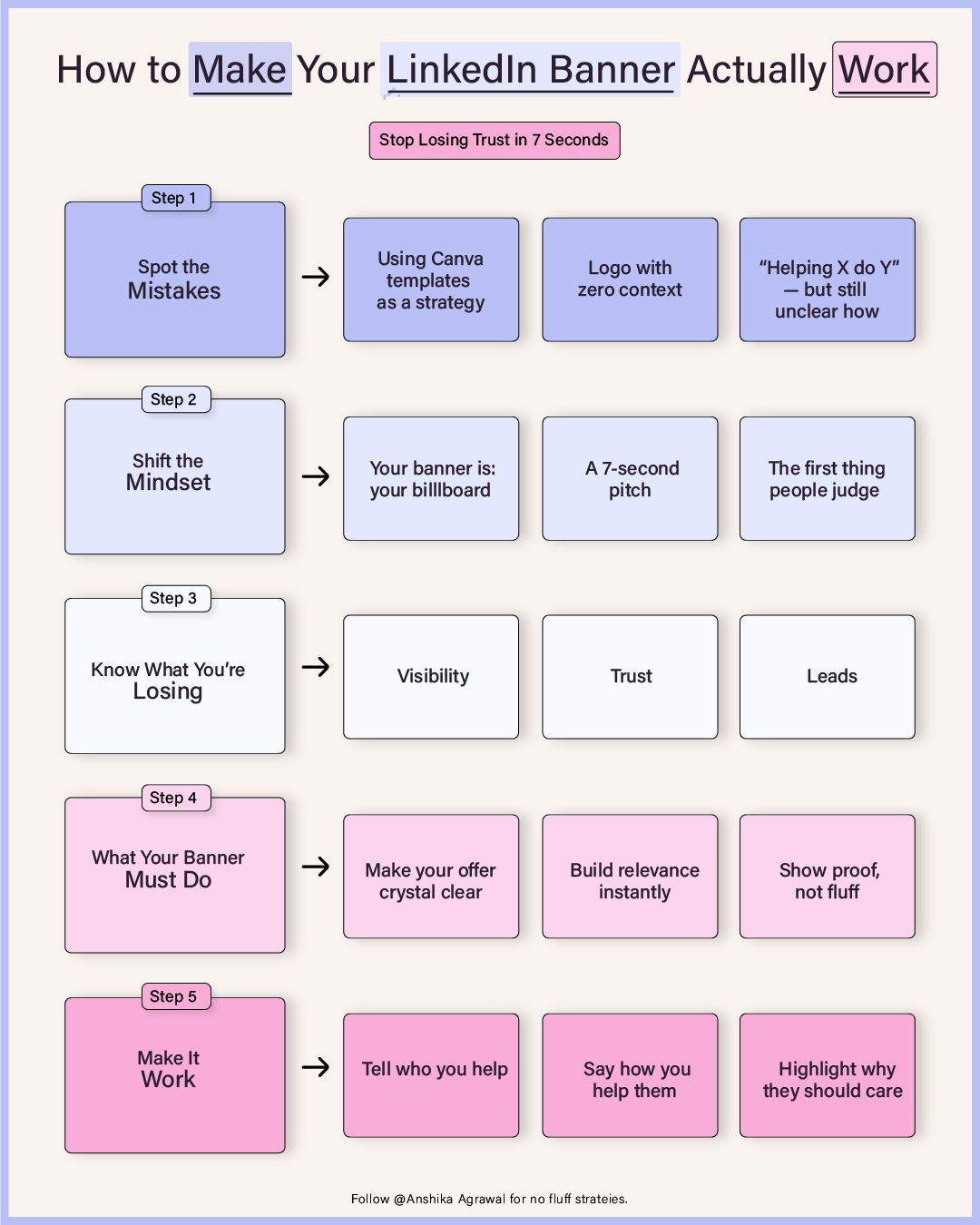
Your banner should simply represent your work through an image — one short line about what you do or who you help, not your whole resume. A plain color or soft gradient background, no cluttered collage. Keep the text big enough to read on a phone, since LinkedIn crops it tight.
Reference: what good banners get right.
Want AI to design it? Generate a banner from your resume
1Open Gemini's image generator (or any other AI image tool you prefer).
2Attach or paste in your resume so it knows your work.
3Copy the prompt below and paste it in.
Prompt to copy — Banner (AI)
Using my resume, design a simple LinkedIn banner image that represents my work. In one clear visual idea, communicate what I do, who I help, and the value I bring — don't just list my job title. Keep it simple: a plain color or soft gradient background, one short line of text, and no cluttered collage of icons or stock photos. Make sure the text is large and legible on a small mobile screen, since LinkedIn crops the banner tightly.
Direction · Step 2.1
Role Exploration
Figure out what jobs fit you, see a real job posting, and find out exactly what you'd need to learn to be ready for it.
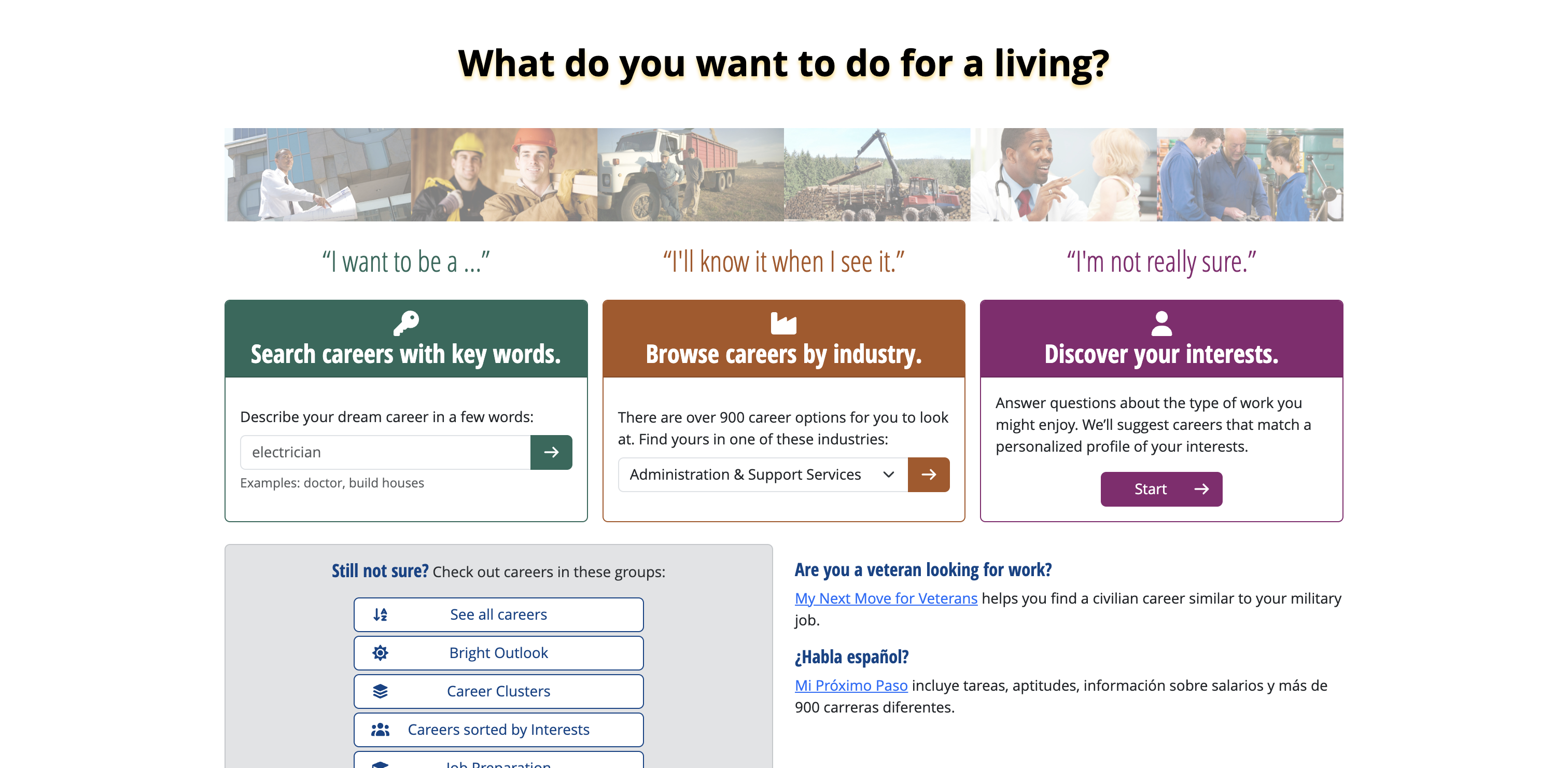
2If you already know what job you want, type it into the green box that says “Describe your dream career in a few words” and press the arrow. If you're not sure yet, click the purple Start button under “Discover your interests” and answer every question it asks you.
This is the page you'll land on — pick whichever box matches you.
3You'll get a list of jobs. Click on one that sounds interesting to you. (Want a specific industry instead? Click Browse careers by industry at the top, pick your industry, then pick a job from that list.)
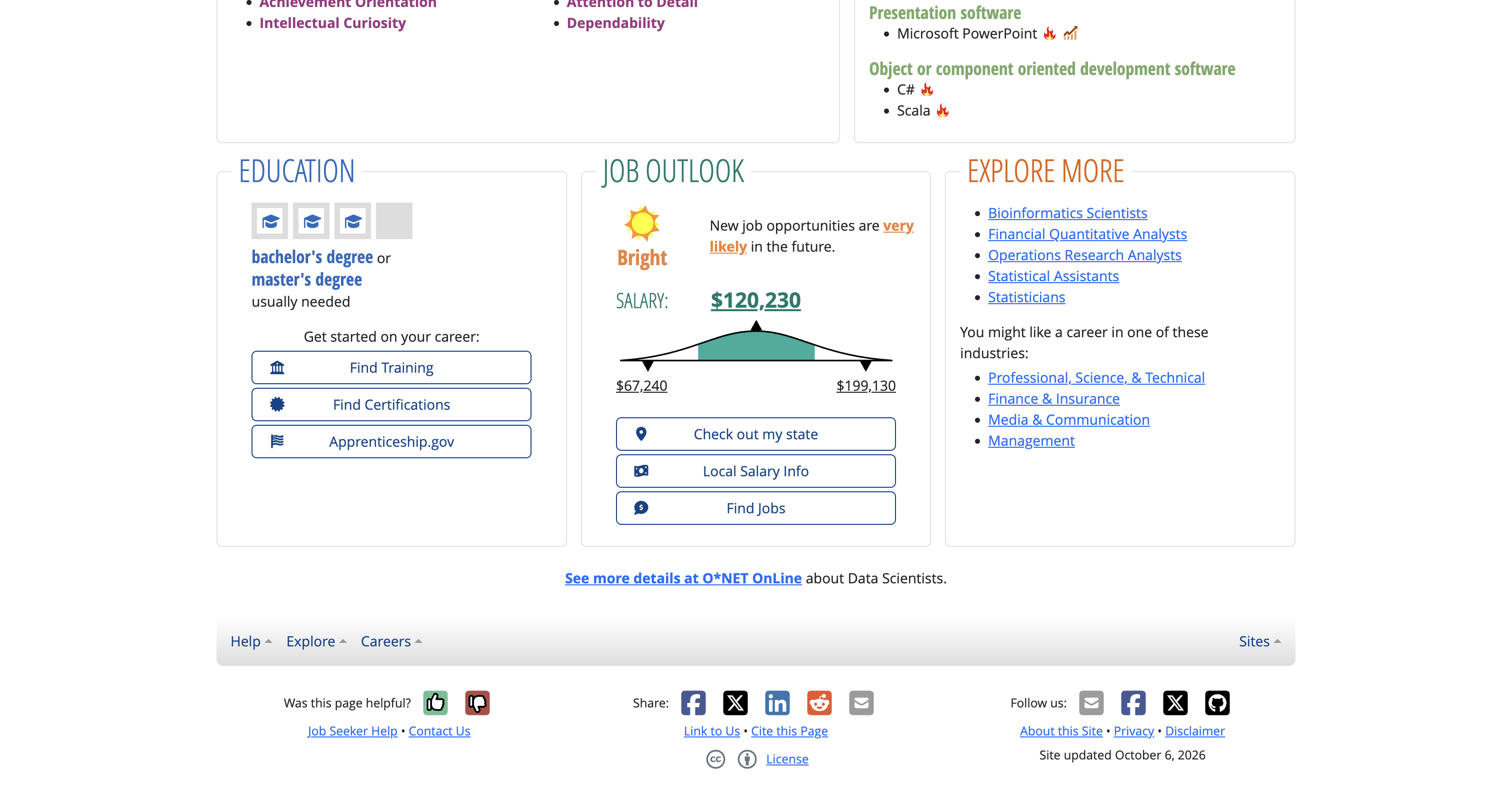
4On that job's page, scroll down to the Job Outlook box and click the blue Find Jobs button.
Scroll to here and click “Find Jobs.”
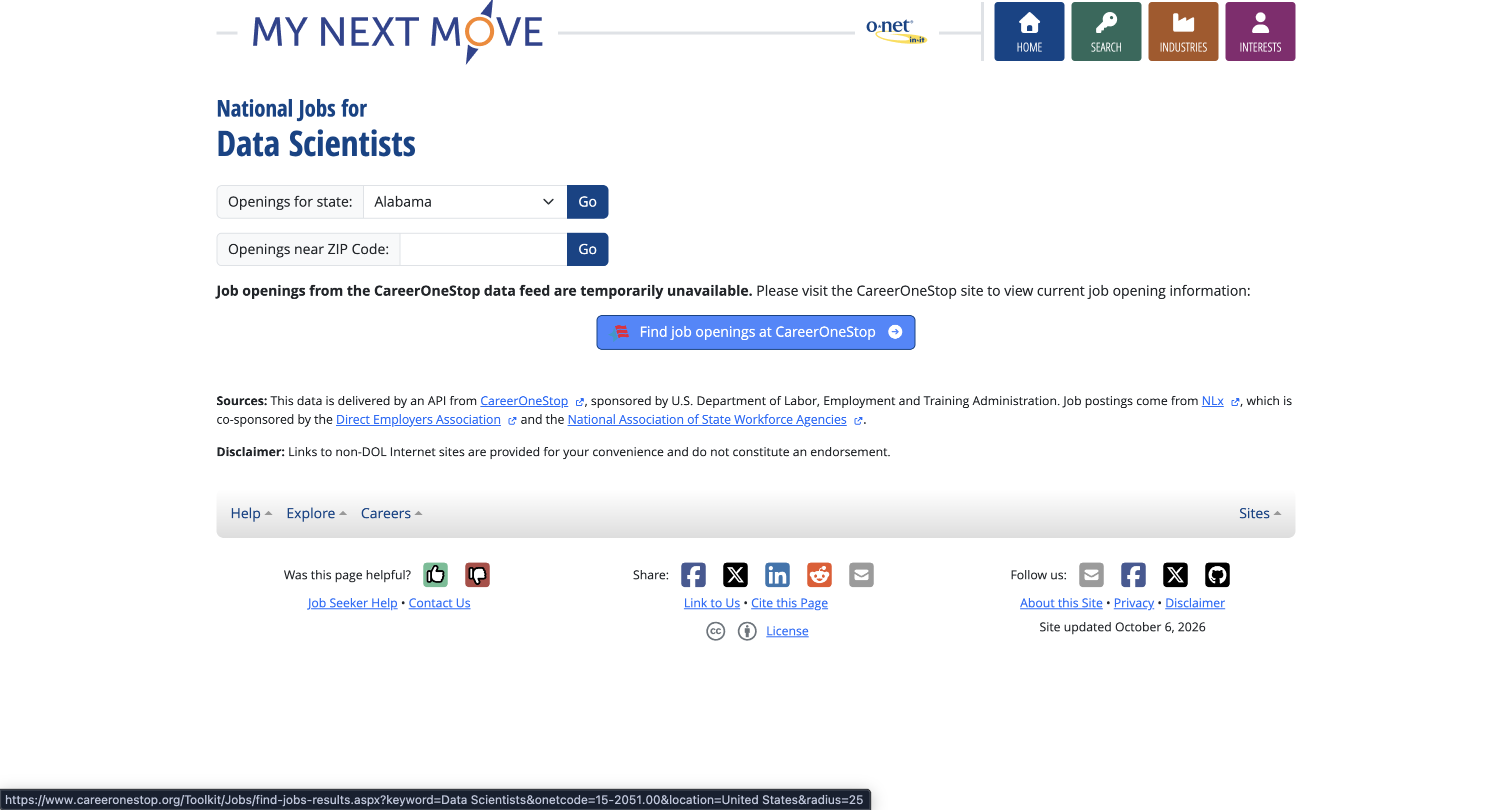
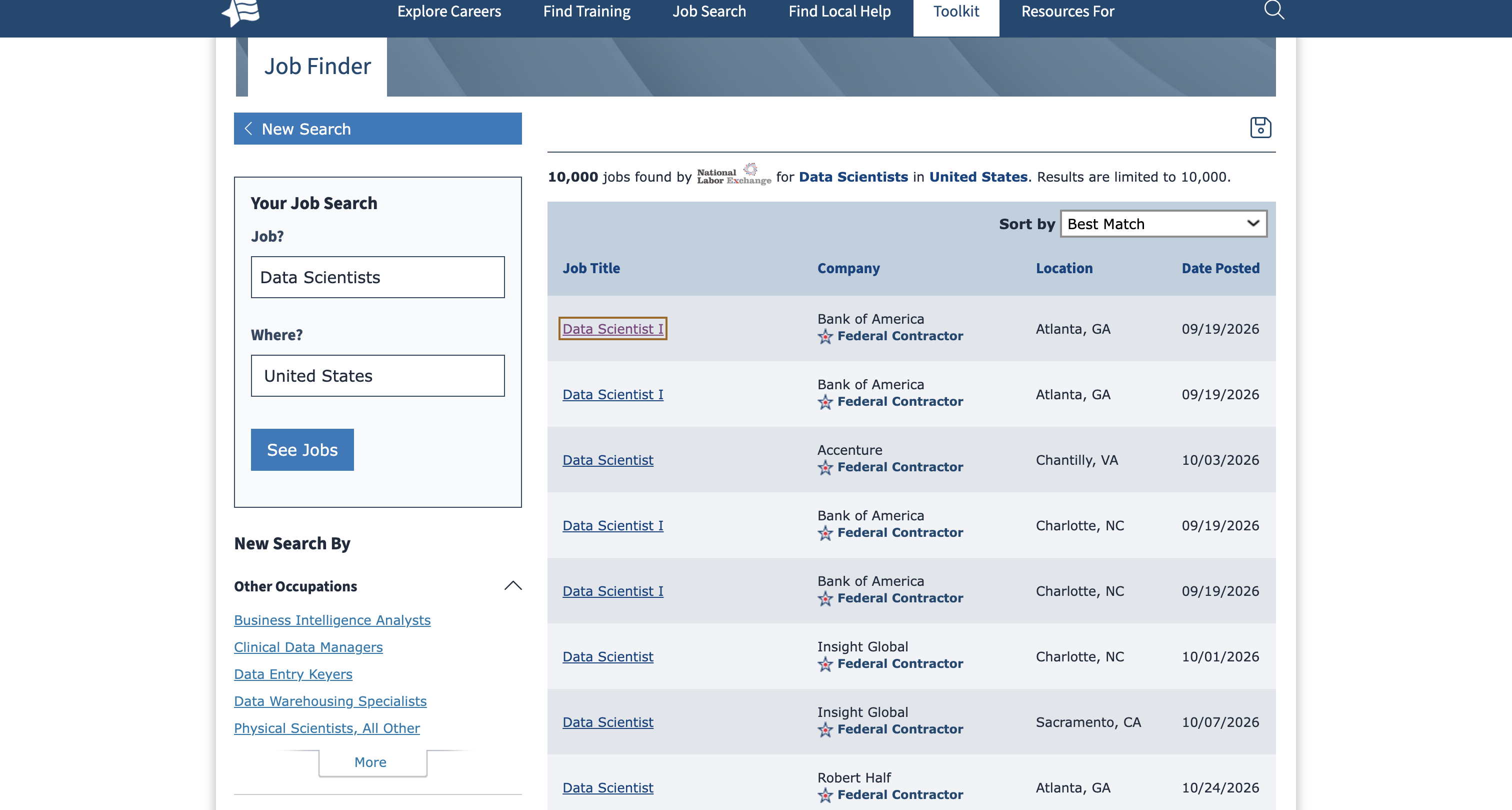
5On the next page, click the blue Find job openings at CareerOneStop button.
Click this button to see real job postings.
6Click on any job title in the list to open the full posting. Copy the whole job description text — the part that lists responsibilities and requirements.
Open any listing and copy its full job description.
7Go back to the chatbot you used for Identity (it already has your resume), or upload your resume again if you're starting a new chat.
8Copy the prompt below, paste it into the chat, then paste the job description right after it and send it.
Prompt to copy — Job vs. Resume Gaps
Compare this job description with my resume and show me the gaps — the skills, tools, or experience it's asking for that my resume doesn't show yet.
Job description:
[paste the job description you copied]
9It will show you the gaps. Now copy the second prompt below and send it in the same chat — it turns those gaps into a roadmap you can follow.
Prompt to copy — Learning Roadmap
Based on the gaps above, build me a step-by-step learning roadmap to close them — starting from where I am right now and ending at what this job needs.
For each step in the roadmap, give me:
1. The skill or tool I need to learn at that step
2. The best tutorials, courses, or articles to learn it, with links
3. A realistic time period to spend on that step
4. A small project I can build at that step to practice what I just learned, so I'm implementing it along the way instead of only watching
Lay it out as a clear, ordered roadmap/timeline I can follow from today until I'm ready for this role.
Save both answers — the gap list and the roadmap are what you'll follow to get ready before you apply.
Opportunity · Step 3.1
Resume Ready
You know what the job needs and you have a roadmap to get there. Now make sure your resume actually shows your impact, not just your duties.
1Go back to the same chat you've been using — it already has your resume, your uniqueness report, the job description, and your skills roadmap.
2Copy the prompt below and send it.
Prompt to copy — Resume Ready
Using everything we've discussed — my resume, my uniqueness report, the job description, and my skills roadmap — rewrite my resume bullet points so each one shows real impact with numbers.
For every bullet point:
- Start with a strong action verb
- Show what I did and the result it produced
- Use a number, percentage, dollar amount, or timeframe wherever possible (example: "Increased quarterly sales by 15% by restructuring the outreach process")
- If I don't have an exact number for something, tell me instead of making one up, and suggest an honest way to phrase it
Give me the updated resume in full, section by section.
Don't let it invent numbers you can't back up. If you're not sure of a figure, tell it so and ask for an honest way to phrase that bullet instead.
Opportunity · Step 3.2
Networking
Most people get replies by offering something first, not by asking a stranger to refer them. This prompt helps you write that kind of message.
1Find someone on LinkedIn who works at a company you're interested in — ideally in or near the role you want.
2Go back to the same chat. Copy the prompt below, then fill in the company name and their role where the brackets are.
Prompt to copy — Cold Outreach
Using my resume and uniqueness report, help me write a short cold email (and a separate LinkedIn message) to [name], who works as [their role/title] at [company name].
Don't make it a referral request. Instead:
- Open with something specific and genuine about their work, their team, or the company — not a generic compliment
- Briefly connect one relevant thing about me to what they do
- Ask one small, easy-to-answer question (their experience, their advice, how their team approaches something) instead of asking for a job or a referral
- Keep it under 100 words, mention no attachments, and end with something easy to say yes to — a quick reply, not a call
Write two versions: one for email, one for a LinkedIn message.
For the thinking behind this approach, watch: this video.
Opportunity · Step 3.3
Applying
Reading and planning only gets you so far — you need to apply in parallel. This step turns your chatbot into a daily job scanner, so new matches come to you instead of you hunting for them every day.
Before you copy this: it was written as an example for an HR candidate in Houston. Fill in the bracketed CANDIDATE PROFILE fields using your own resume and the job search from Step 2 — you don't need to redo that work, it's already in your earlier chat. Swap in your own target role, skills, tools, and location in every bracket, including the task name — not HR, unless that's actually your field.
Prompt to copy — Daily Job Match Scan
Create a recurring task named “Houston HR Job Match Scan.” Run every weekday at 8:00 AM in America/Chicago. If this platform supports only daily recurrence, explain that limitation before saving and use a daily schedule only after confirmation.
CANDIDATE PROFILE — use only these verified facts:
Candidate identifier: [name or identifier]
Experience: [years, roles, responsibilities, team size and industries]
HR skills: [employee relations, recruitment, compliance, compensation, benefits, performance management, HR analytics, etc.]
Tools: [Workday, ADP, UKG, SAP SuccessFactors, Excel, etc.]
Education and certifications: [verified qualifications]
Target roles and seniority: [HR Manager, HR Business Partner, People Operations Manager, etc.]
Location and commute: [Houston and explicitly allowed surrounding areas]
Work arrangement: [onsite / hybrid / remote; remote must permit Texas]
Salary: [requirements or not specified]
Work authorization / sponsorship: [explicit constraints or not specified]
Hard exclusions: [list or none]
PROCESS FOR EVERY RUN:
1. If essential candidate information is missing, ask for it before saving the recurring task. Do not substitute another person's background.
2. Search current vacancies matching the profile in the allowed locations. Include adjacent titles only when actual responsibilities and seniority fit.
3. Prefer postings from the last seven days. On subsequent runs, prioritize new or changed jobs since the last successful run. If prior-run state is unavailable, say so and use the seven-day window; do not claim cross-run deduplication.
4. Use employer career sites and employer-authorized ATS pages as primary evidence. Job boards may help discovery, but resolve every shortlisted result to the exact individual employer/ATS requisition page.
5. Open each job page and verify employer, title, location, requisition ID, requirements and evidence that applications remain open. Record the verification timestamp. A page merely loading does not prove the vacancy is active.
6. Do not invent URLs, salary ranges, posting dates, sponsorship policies, contacts or candidate qualifications. Mark unknowns explicitly. Put blocked or unverifiable leads in a separate section, not the verified shortlist.
7. Score documented fit out of 100: responsibilities and skills 35; seniority and scope 25; industry relevance 15; tools and certifications 15; location and work arrangement 10. Explain scores using job-page and candidate-profile evidence. Unstated qualifications are unknown, not confirmed matches. Scores are not hiring probabilities.
8. Exclude explicit hard-constraint conflicts. Flag unknown salary or sponsorship rather than assuming a match. State two evidence-backed strengths and up to two gaps or unknowns for each shortlisted vacancy.
9. Return up to 10 verified matches scoring at least 70. Return fewer if appropriate. Do not pad the list. Deduplicate within the run using employer and requisition ID, otherwise the canonical individual job URL.
OUTPUT:
Run date, time and timezone; candidate summary; sources searched; access limitations.
Table columns: rank; job title; employer; location/work arrangement; posted date or unknown; salary or not listed; fit score; match evidence; gaps/unknowns; requisition ID; exact individual job URL; employer career homepage; verification timestamp.
Explain the top three matches briefly. List unverified leads separately.
If nothing qualifies, say “No verified qualifying matches found” and explain search coverage and limitations.
Run it once manually first and check that the links are real, individual job postings before you turn on the daily schedule.
Set it up as a recurring task
Pick whichever of these you already use. All three can run this prompt on a schedule, automatically, every weekday morning.
Gemini
1Open gemini.google.com and sign in. In your account activity settings, turn on “Keep Activity” — Google requires it for schedules.
2Paste the prompt above into a normal chat first and run it once, as a one-time test (not scheduled yet). Check that the links are real job pages.
3After reviewing the result, ask: “Schedule these exact instructions every weekday at 8:00 AM, America/Chicago.” Review the schedule summary it shows you.
4Open Scheduled in the sidebar to confirm the saved task and its next run. You can pause, resume, edit, or delete it from there anytime.
ChatGPT
1Open chatgpt.com and sign in. Use the website if your app doesn't show “Scheduled.”
2Run the prompt above once in a normal chat first.
3Open Scheduled to create the recurring task, or just ask in that same chat: “Schedule these exact instructions every weekday at 8:00 AM America/Chicago.”
4Check that the task shows up in Scheduled with the right instructions and cadence. Turn on notifications under Settings → Notifications if you want alerts. Inspect your first completed run to make sure it actually searched live job pages, rather than reusing old results.
Claude
1Open claude.ai or Claude Desktop and sign in to an eligible paid plan.
2Run the prompt above once in a normal conversation and check the links it gives you.
3Open Scheduled in the sidebar → New task → Set up manually. Enter the task name, the full prompt, the frequency, and 8:00 AM America/Chicago — or choose Create with Claude and answer its setup questions instead.
4Choose approval settings that keep this to research-and-report only — it shouldn't take external actions on its own. Save, then check Scheduled to see the task, its next run, and its results.
Track everything
Log every resume you send, every person you network with, and every interview — so nothing falls through the cracks.
Job Search Tracker
A spreadsheet with tabs for resume submissions, networking contacts, interviews, and career sites.
You can use Claude to auto-apply for jobs instead of spending hours doing it manually. Watch how here: this video.
Prefer to pay instead of doing it yourself? Tsenta is a paid AI agent that applies to jobs on your behalf. Totally optional — everything above this works for free.
Readiness · Step 4.1
Interview Prep & Mock Interview
One prompt does two things: it gives you the 12 most likely interview questions with model answers, then turns your chatbot into a live interviewer so you can practice them out loud before the real thing.
1Open ChatGPT — this one specifically, since you'll use its Voice Mode later for the practice interview. New chat or your existing one both work.
2Paste in your resume and the job description you copied in Direction. If you know anything about your interviewer — their LinkedIn, how they come across, anything — paste that too. If you don't have it, that's fine, skip it.
3Copy the prompt below and send it — it finds real questions other people were actually asked for this kind of role.
Prompt to copy — Find Real Interview Questions
Act as an HR recruiter hiring for this role. Here is the job description:
[paste the job description you copied in Direction]
Based on this job and the company, what questions would they likely ask in an interview for this role? Then point me to real sources where I can find actual interview questions previous candidates have reported for this company or similar roles — things like Glassdoor interview reviews, LinkedIn posts from people who interviewed there, Blind, or relevant subreddits. Give me direct links or the exact search terms I should use to find them myself, so I can read real, previously-asked questions, not just your predictions.
4Now copy the prompt below and send it in the same chat — this is the one that builds your ranked prep sheet and runs the live mock interview.
Prompt to copy — Interview Prep & Mock Interview
Act as an expert executive recruiter, hiring manager, organizational psychologist, and professional interview coach. Based on the information I provide about the company, job description, interviewer's personality profile (if available), and candidate's résumé, identify and rank the 12 most important and likely interview questions for this position. Analyze the company, job requirements, candidate's qualifications, accomplishments, strengths, and potential gaps. Consider the interviewer's DISC profile, communication preferences, decision-making style, and behavioral tendencies when available, treating personality predictions as hypotheses rather than certainties. For each question, provide (1) the exact interview question, (2) why it matters, (3) a recommended answer based on the candidate's actual experience, (4) one challenging follow-up question, and (5) a preparation tip identifying supporting examples, evidence, or metrics. Do not invent qualifications or accomplishments. Conclude with the three most important messages the candidate should communicate, the greatest potential concern about their qualifications, and three intelligent questions to ask the interviewer. Keep the analysis specific, practical, and concise.
MANDATORY SECOND PART — INTERACTIVE MOCK INTERVIEW: After presenting the 12 questions, always include an interactive Mock Interview section allowing me to practice any of the 12 questions. Act as the actual interviewer, adopting their likely professional communication style and level of technical rigor. Ask one question at a time and wait for my response. Support two methods: Voice Interview, where I use ChatGPT Voice to hear your questions aloud and answer verbally, and Microphone/Text Interview, where you display each question, and I respond using microphone dictation or typing. After my answer, ask one realistic, challenging follow-up question and wait for my response before evaluating the complete answer. Then provide (1) a score from 1 to 10, (2) strengths, (3) areas for improvement, (4) missing technical or business evidence, (5) specific recommendations to improve the response, and (6) an example of an excellent answer grounded in my actual experience. Evaluate technical accuracy, relevance, clarity, structure, confidence as conveyed by the response, and commercial judgment. If audio is available, also evaluate delivery, pace, filler words, and professional communication. If only a transcript is available, do not claim to evaluate vocal qualities. Maintain a record of scores and progress throughout the interview. After feedback, ask whether I want to retry the same question or proceed to the next. At the end of the session, provide an overall interview readiness score, a summary of strengths and weaknesses, and a personalized improvement plan. Always end the initial preparation by inviting the candidate to begin the Mock Interview, preferably with an interactive question selector when available.
5Read through the 12 questions, why each one matters, and the suggested answers — this is your prep sheet. Save it somewhere you can reread before the real interview.
6When you're ready, tell it to start the Mock Interview. Choose Voice (turn on ChatGPT's Voice Mode and speak your answers out loud) or Text (type, or dictate with your phone's microphone). If you can, turn on your phone or laptop's camera and record yourself while you go. Grok's voice mode (free through your Cursor student account) works well for this kind of live back-and-forth practice too, if you'd rather use that.
7Answer one question at a time. It'll push back with a tough follow-up, then score you 1–10 with specific feedback. Tell it whether you want to retry that question or move to the next one.
8If you recorded yourself, watch it back afterward. The chatbot only sees your words — it can't catch your tone, your pace, or the exact moment you fumbled. Watching yourself will.
9At the end, save your overall readiness score, your strengths/weaknesses summary, and your improvement plan — that's your focus list before the real interview.
No two mock interviews come out the same. Run it again closer to the real interview to practice the questions you scored lowest on.
Last Step
Help Us Improve
You just went through all four parts — Identity, Direction, Opportunity, and Readiness. Two minutes of honest feedback helps us make this better for the next student. Totally optional, nothing here is graded.
This opens your email app with your answers already filled in — just hit send.